Hi everyone — I’m tuning HQPlayer filters and dithers for intimate, natural vocals on the HEDDphone Two. I’m currently comparing sinc-Lh vs gauss-xl and using NS9, but curious about others’ experience with LNS15 and other shapers for PCM 768kHz playback. I’m focused on realism, depth, and musical connection — not just measurement fidelity.
@GoldenSound Just bought a CYAN2 and am grateful for the review and settings.
Brief history. Was going to go to Magna to get a May L3 (an excuse to go to some concerts and dance in Amsterdam and The Hague), Magna recommended the L2 and that same day accidentally bought a Wildism L2 off a mate of yours in Islington. Soon found myself using HQ Player as I had a spare Mac Mini. Good DAC, but large and runs hot and needs to warm up. As the CYAN2 does all I want, with optimised usb and I will only use for native DSD via a Pulsar streamer, and it is small and runs cool, it made sense and so far so good.
I was wondering:
- Why recommended bits is 20 for May and 18 for C2
- You have DirectSDM toggled on. What is that about?
- You have PCM 6DB gain toggled and 0.00 PCM gain compensation. Jussi’s May recommended settings were PCM 6DB gain off and -6dB PCM gain compensation. Do these settings amount to the same thing?
With the C2 using ASDM7EC-light and sinc-Mx on an M2 Pro 16gb I’m getting quite a long delay before I hear anything, but then faultless playback. Never had the the delay with the L2. Think I was using poly-gauss-long. Wondering what could be the cause. Any idea?
This is just because the converters in the May/Spring 3 are more linear than the one in the Cyan 2. So the noise shaper can operate at a higher bit depth.
When setting bit depth, you want to ensure that the noise shaper is operating entirely within the linear range of the DAC, otherwise the DAC won’t actually be doing what the noise shaper is instructing it to do as it’s not accurate at that level. By setting this correctly you actually extend the linearity of the DAC within the audible band quite substantially.
If you set it too low, for example setting it to 15 bits even if your DAC is linear to 18 bits, it’s usually fine, you may get a little less dynamic range if you go way too low but given as the noise shapers like LNS15 can give you quite a massive improvement to dynamic range you’ll likely end up with more actual effective dynamic range with LNS15 at 16 bit than you would using the DAC natively with no HQPlayer.
But if you set it too high, say 24 bits, then the DAC isn’t accurately reproducing the noise shaper’s output at all and so it’s effectively pointless. You end up with less actual dynamic range than if you correctly set it to 20/18 bits.
As a practical example, here’s a test I did on the Hifiman EF400. Inherently it’s only linear to about -80dB, so small signals below that don’t get reproduced particularly accurately.
If we either run it with no HQPlayer, or use HQPlayer but with bit depth set to ‘default’ or 24 bits, then when playing a really small -120dB signal this is what we get at the output of the DAC:
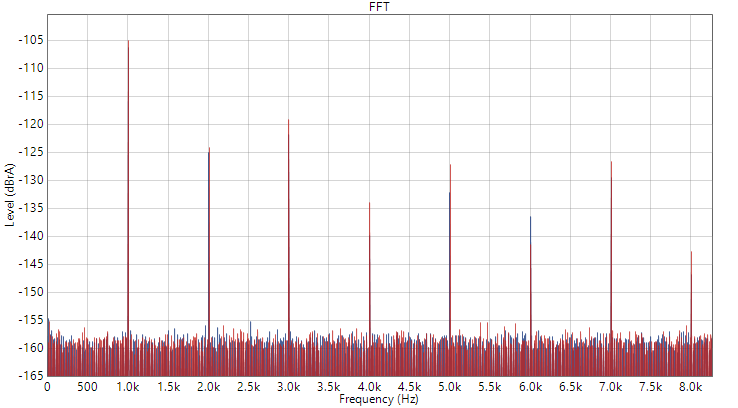
Not only is there a fair bit of distortion, but if you look at the 1khz tone itself, it’s not even the correct level, at -105dB instead of -120dB.
But if I instead set the noise shaper bit depth to within the linear range of the DAC (in the case of the EF400 that’s 15 bits), then this is what we get:
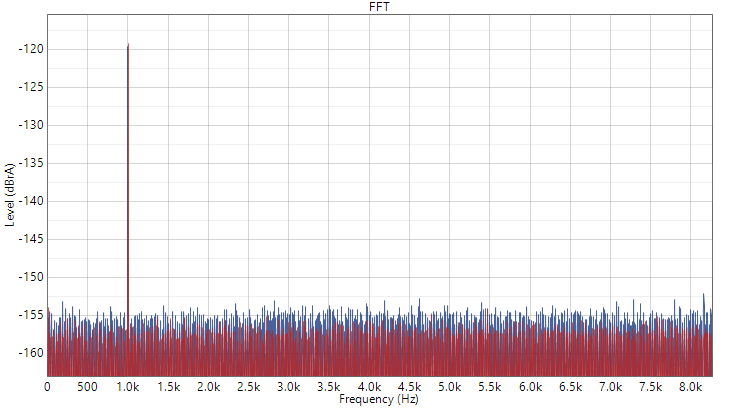
Now the distortion is gone, and the 1khz tone is much much closer to the correct level of -120dB. The linearity of the DAC has been improved substantially and small signal accuracy will be drastically better.
The May’s converters are more accurate than the Cyan 2’s with about 12dB more inherent linearity, so you can set the bit depth a bit higher.
This setting means that when feeding DSD source material to HQPlayer, it will pass it through untouched rather than doing any further processing. With DSD source material, you already have the effects of whatever modulator/noise shaper was used to create it baked in, and so remodulating in HQPlayer usually is not a good idea and won’t provide a benefit. If you have actual DSD files it’s best to just play them natively with no further processing, since you can’t get the benefits of a higher dynamic range modulator like you can when converting a 24 bit PCM file to DSD in HQPlayer since the source material was already limited by the modulator used to make it.
These should give the same end result, but you can change to Jussi’s settings if preferred just in case.
Personally though I much prefer PCM on the May/Cyan 2 over DSD anyway so I tend to stick to PCM.
1 Like
This is exactly what I want to learn about currently. I unfortunately ordered the Topping Centaurus when I should have gotten the Cyan, but my knee jerk reaction was to go for the Topping because it has BT PEQ and OS. My use case will be away from a computer by design and I need to know how to OS without one.
Is this possible?
Topping has released 2 new firmware for the Centaurus since Golden’s video which I believe addresses some of his concerns. I would be good to hear an update from Golden about this. I am a Centaurus owner and I am very happy with this DAC.
2 Likes
I’ve stumbled onto a excellent upgrade with PGGB-RT. I’ve been using the Sonarworks S/W for EQ, and it works well, BUT, when I combine it with PGGB-RT, ran into some limitations. The boffins From PGGB-RT suggested that I use AutoEQ app and apply the EQ from the site to PGGB-RT convolution EQ setting in PGGB-RT. Since the majority of my headphones are Sennheiser’s, the site had ready made EQ settings available.
So, using the EQ settings for the HD 660S2 in PGGB-RT, taking a .WAV file at 44.1 KHz upscaled to 705 KHz, using a Topping D900 DAC and a Bryston BHA-1 headphone amp, the HD 660S2 sounded like a completely different, and much more expensive headphone. To say I was taken aback was an understatement. I tried other headphones briefly (HD 650, Ultrasone Edition 8), and also experienced a major improvement in sound.
This has me questioning the explosion in flagship headphones, and their very high prices. Thoughts?
1 Like
I’ve had mixed results with the EQ settings from AutoEQ. You might try using oratory1990’s presets instead. Note that the oratory1990 AutoEQ preset is not the same. The AutoEQ preset is based on oratory1990’s measurement but the filters are created using an algorithm. The preset filters from oratory1990’s Reddit are created by him.
Even better in my opinion are Listener’s presets.
You might need to convert the parametric EQ into convolution filters to use with PGGB-RT. REW can do this and the output is mathematically equivalent.
2 Likes
I’ve tried AutoEQ with the Sennheiser HD 660S2, HD 650, and Ultrasone Edition 8. Pretty happy with them.
I’ll check out the other items listed. Thanks.
1 Like
I’m thinking HQPlayer is the perfect “DAC upgrade” for my Warwick Bravura system. I’ve trialed it in the past as a Roon output so everything’s working. I tried using your Cyan 2 settings with the max rate turned down to 384 with decent results, but since it is an R2R DAC I suspect those settings are not optimal for the Sonoma’s DAC.
Also does anyone have any suggestions on how to configure Roon for gapless playback with HQPlayer? It’s not working for me.
1 Like
Any chance you can start a thread about PGGB? I’m pretty happy with it, but would like to learn more.
Thank you for your detailed analysis and advice. I have a Holo Red and May, but no experience with HQplayer. Do you have a recommended settings file for the May and/or May/Red combination?
Thank you!
Roon will play gap less through HQP if you’re playing a continuous play list/album. But when either manually changing track or playing through roon radio etc there needs to be some processing time as it switches.
Use the HQP settings for cyan 2 in my folder but change sample rate to 1.536Mhz and bit depth to 20
Tbh I think this thread is also fine for discussing pggb. Feel free to ask any questions!
What’s your take on the convolution settings for PGGB? I’ve tried them with a variety of Sennheiser headphones. The results I’ve experienced to date using Auto EQ with convolution settings has been mixed. In some cases, it seems to provide some improvement, whilst other cases, it makes it sound worse. Trying to work out why that would be.
Update: Wrote the developer of PGGB and asked about AutoEQ convolution settings. He came back with recommended settings for file generation. Tried the recommendations provided, and the revised convolution files definitely worked better. The recommendations were to set sampling frequency at 96KHz, 32 bit floating point, linear, phase, and set the lower frequency at 1 Hz.
I’ve read Resolve’s advice on EQ, and I mostly understand what’s he saying. Having said that, the AutoEq convolution settings with PGGB-RT does seem to work more often than not.
Thanks!
What do you think about using HQP with the Sonoma M1 + Bravura? I’ve read some opinions that it’s best not to upsample with the Sonoma because of its unique DSP.
HQP and PGGB are both excellent convolution engines as they can do the convolution at far higher bit depth/precision than other options and with excellent noise shapers.
I’m not at all a fan of auto-EQ. Auto-eq imo (and @Resolve and @listener I imagine will concur) is useful for making terrible headphones less terrible, but on any decent headphone will likely just make things worse.
Manual EQ is far better and the single best thing any headphone enthusiast can do to improve their system/listening experience is learn to EQ stuff themselves to fit how a headphone is actually behaving for them, on their own head.
1 Like
The bravura’s DSP works fine at any of the supported input rates, I don’t think there’s any reason not to use HQP with it if you want to
OK, thanks. Let’s take a little deeper dive. Couldn’t one use the AutoEQ app and set the values manually to tailor to individual preferences? The convolution approach with PGGB seems to be the most accurate method to implement EQ.
You can, but doing that (especially if then needing to export a convolution, apply it and listen each time) is not particularly conducive to getting a good result.
To EQ the behaviour of a headphone on your head properly you do kinda need a more ‘real time’ solution and at that point just manually EQ anyway.
As to convolution vs ‘traditional’ EQ. Neither of these is strictly speaking more accurate. A normal parametric EQ and a convolution as long as you’re making the same adjustment will have exactly the same effects. In fact if you’re not using a convolution engine (and convolution filter) with sufficiently high coefficients then the parametric EQ may be more precise.
The benefit to doing the adjustment in something like HQP/PGGB is that it’s applied with the maths being done at higher levels of precision, though you can do both EQ and Convolution in PGGB and HQP anyway, so even if using those I wouldn’t use convolution personally as it just adds extra steps and makes things harder to adjust.
And stuff like Roon does the EQ at 64-bit too so
Personally I would say that it’s worth making the effort to do your EQ in something like Roon/HQP/PGGB instead of something like EQ-APO which is running at a lower bit-depth precision, but with EQ the ability to quickly make adjustments and fine tune things is far more important to getting an ideal result than sacrificing that to keep >64 bit compute precision. So I would strongly recommend people EQ in whatever tool will allow/encourage them to actually USE and tweak the EQ the easiest
2 Likes